Poqolorex
Loom Series
Loom Series
Couldn't load pickup availability
1. Problem Statement
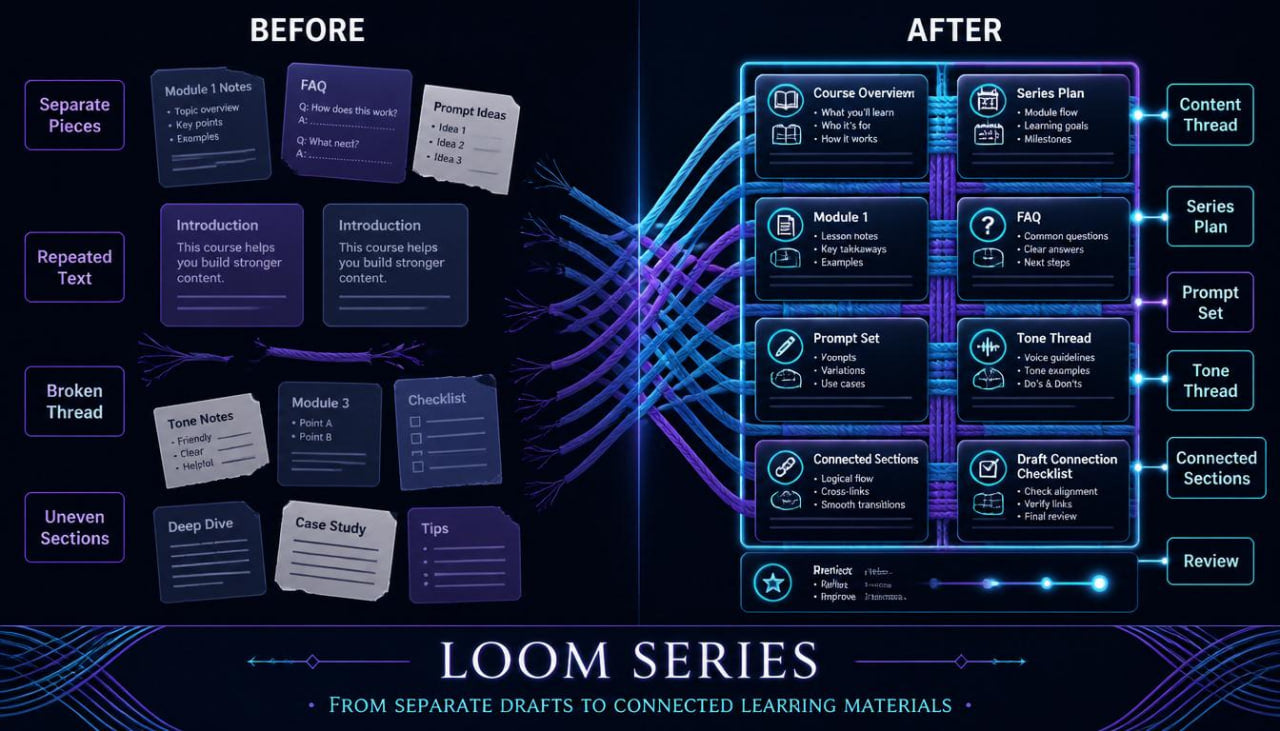
Many learners can create one strong draft, but building a connected group of materials can feel harder. A course page, learning module, FAQ block, and educational article may all begin from the same topic, yet each one needs a slightly different structure and tone. When there is no shared thread, these materials can feel separate, repeated, or uneven. AI can help draft and organize content, but it needs careful direction from the learner to keep each piece aligned with the same idea. Loom Series is designed for learners who want to create connected content materials with clearer planning and steadier creative order.
2. Course Response
Loom Series teaches learners how to plan AI-assisted content as a connected series rather than isolated writing tasks. The course begins with a main topic, then shows how to divide it into smaller content threads for different page sections and learning materials. Learners practice writing prompts that carry the same tone, message, and structure across several drafts. The course also includes revision methods for checking whether each piece feels connected without sounding repetitive. Its focus stays on organized learning, useful examples, and careful human editing.
3. What’s Inside
Loom Series includes detailed materials for learners who want to build a connected set of AI-assisted content pieces around one theme.
The first material is the Content Thread Map. This worksheet helps learners define one central topic and then divide it into related content threads. For example, one topic can become an introduction, a lesson outline, a FAQ answer, a benefit-style section, a learner-fit paragraph, and a closing note. The map helps each piece carry its own role while still staying connected to the same creative direction.
The second material is the Series Planning Sheet. This guide helps learners organize several pieces of content before drafting begins. It includes fields for theme, reader need, section purpose, tone, key points, examples, and revision notes. This makes it easier to plan a full set of materials without starting each section from zero.
The course also includes the Loom Prompt Set. This collection gives learners prompt patterns for creating related drafts. There are prompts for planning a course page, writing an introduction, expanding a short idea, building a FAQ answer, shaping a module summary, creating a resource description, and revising tone. Each prompt includes guidance on what context to add and how to adjust the instruction for a different content task.
Another part of Loom Series is the Tone Thread Guide. This material helps learners keep the same voice across several pieces. It explains how to choose a calm educational tone, how to keep wording steady, and how to avoid phrases that sound too strong for learning-based pages. The guide also includes sample tone notes that can be added to AI requests.
The course includes the Section Weaving Framework. This framework shows learners how to connect several page sections without repeating the same sentence structure. It covers opening lines, topic bridges, supporting details, examples, and closing phrases. Learners practice making each block feel related while giving every block a distinct purpose.
Loom Series also provides the Module Shape Planner. This worksheet helps learners plan small learning modules around one topic. Each module can include a concept, a short explanation, a guided task, a reflection question, and a review note. The planner is useful for learners who want to turn a broad idea into several organized learning pieces.
The next material is the Draft Connection Checklist. This checklist helps learners review AI-assisted writing after several drafts have been created. It asks whether the materials share the same topic direction, whether the tone stays steady, whether sections repeat too much, whether the message is clear, and whether any wording feels exaggerated.
Another section is the Content Reuse Guide. This guide teaches learners how to adapt one idea for several formats without copying the same text everywhere. A main explanation can become a short intro, a learning note, a FAQ answer, or a worksheet prompt. The guide helps learners reshape material with care while keeping each version useful.
The course also includes the Creative Thread Journal. This reflection page helps learners record how one theme developed across several drafts. Learners can note the original idea, the prompt used, the section created, the revision needed, and the final wording direction. This builds a habit of thoughtful content review.
Loom Series provides the Course Page Bundle Builder as well. This material guides learners through creating a full set of course page sections, including headline, subtitle, short description, inside materials, learner fit, skill points, refund note, and contact text. The builder includes wording reminders for clear, calm, learning-focused copy.
The final part includes Practice Materials. Learners choose one theme, create a Content Thread Map, write three related prompts, draft several connected sections, and review them using the Draft Connection Checklist. These tasks help learners practice building a connected content set with AI support and human revision.
4. Who Is This For?
Loom Series is for learners who want to create several connected content materials around one theme. It is useful for course builders, writers, educators, creative teams, and learners who work with learning pages, course descriptions, content blocks, and resource materials.
This course fits people who already know how to create a single AI-assisted draft but want better structure across multiple sections. It is also helpful for learners who want their page copy, course materials, FAQ answers, and learning notes to feel connected.
Loom Series is especially suitable for people who create educational materials in sets. The course helps them plan each section, write stronger prompts, review repeated wording, and keep the final materials organized.
5. What You’ll Learn
- How to turn one topic into several connected content threads
- How to plan related page sections before drafting
- How to write AI prompts for a connected group of materials
- How to keep tone steady across several content pieces
- How to shape course page sections with clear structure
- How to adapt one idea into different learning formats
- How to build small learning modules from a broad topic
- How to review related drafts for repetition and clarity
- How to create section bridges between ideas
- How to use a checklist for connected content review
- How to keep course copy calm and learning-focused
- How to combine AI support with careful human editing
6. 30-Day Refund Note
Loom Series is covered by the Poqolorex 30-day refund period for paid courses. Learners may request a refund within 30 days according to the store’s refund terms. This note keeps purchase terms clear while the course page stays focused on structured learning, connected materials, and thoughtful content practice.
Self-paced learning overview
- 📁 Digital file available after purchase
- 🗂️ Long-term availability
- 🔐 Secure checkout
- 📝 Content updated in 2026
What is Poqolorex about?
What is Poqolorex about?
Poqolorex offers AI-focused courses, lessons, modules, materials, and resources for content creation. The materials are built for learners who want a structured way to explore ideas, prompts, planning, writing, and creative organization.
Do I need prior AI knowledge?
Do I need prior AI knowledge?
No prior AI background is required. The courses are written with clear guidance, practical examples, and learning steps that help you understand each topic at a comfortable pace.
Are the materials tied to specific apps or programs?
Are the materials tied to specific apps or programs?
No. Poqolorex keeps the learning focused on content thinking, AI-supported workflows, idea development, and creative structure without naming specific apps, programs, services, or operating systems.
Share