Poqolorex
Align Series
Align Series
Couldn't load pickup availability
1. Problem Statement
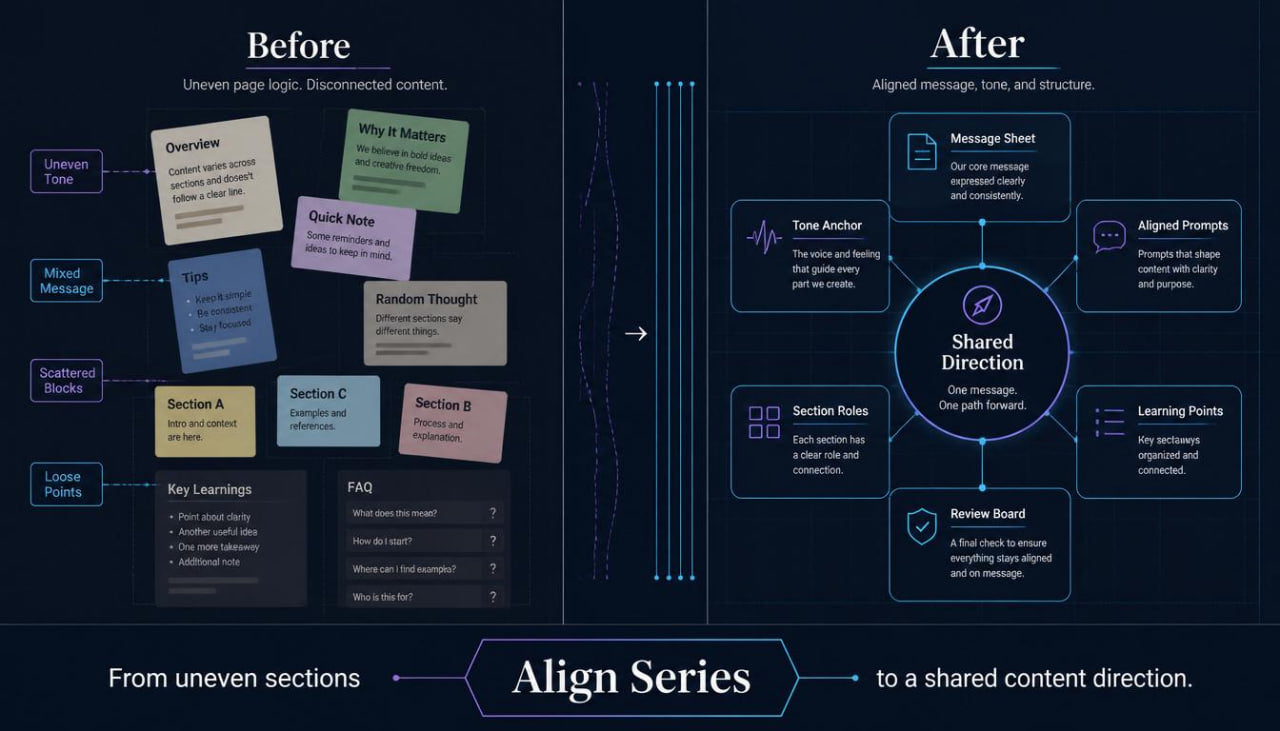
Many learners can create separate pieces of content, but those pieces may not always feel like they belong together. A headline may sound creative, while the description feels too formal, the FAQ feels too plain, and the learning points feel disconnected from the main idea. When tone, structure, and message direction are not aligned, the full page can feel uneven even if each part is useful on its own. AI-assisted writing can make this issue more visible because each prompt may lead to a slightly different style. Align Series was created for learners who want to keep their content organized, steady, and connected across several sections.
2. Course Response
Align Series teaches learners how to create a shared direction before writing with AI support. The course begins with a message alignment sheet where learners define the main topic, reader type, tone, wording boundaries, and section purpose. Learners then use guided prompt formats to create page blocks, module notes, FAQ answers, and learning summaries that follow the same creative direction. The course also includes review tools for checking whether each section still matches the original plan. Its focus is on structured learning, calm creative control, and thoughtful editing rather than bold claims or dramatic wording.
3. What’s Inside
Align Series includes a detailed group of materials for learners who want to create AI-assisted content with a steady tone and shared message direction.
The first material is the Message Alignment Sheet. This worksheet helps learners define the central idea of a content page or learning sequence before writing begins. It includes fields for topic, reader profile, purpose, tone, key phrases, wording limits, and section roles. Learners use this sheet as a reference while creating prompts, outlines, and drafts.
The second material is the Tone Anchor Guide. This guide helps learners choose a voice that can remain steady across multiple content blocks. It explains how to describe tone using practical language, such as calm, warm, clear, thoughtful, editorial, educational, or concise. It also shows how to avoid overstatement and keep wording suitable for learning-focused pages.
The course also includes the Aligned Prompt Builder. This material teaches learners how to build AI requests that carry the same direction from one task to the next. Each prompt includes topic context, audience notes, tone guidance, format, section goal, and review instructions. Learners can use this builder for course descriptions, FAQ blocks, About pages, Contact pages, module summaries, and educational writing.
Another part of Align Series is the Section Role Map. This worksheet helps learners assign a clear job to each part of a page. The headline introduces the idea, the subtitle adds context, the description explains the course focus, the inside section lists materials, the learner-fit section guides the reader, and the learning points show specific skills. This map helps reduce repetition and gives each block a clear place.
The course includes the Consistency Review Board. This checklist helps learners compare several AI-assisted drafts side by side. It asks whether the tone matches across sections, whether the main idea remains visible, whether the wording feels balanced, and whether any part sounds too strong, vague, or unrelated. The review board supports careful editing before the final copy is placed on a page.
Align Series also provides the Headline and Subtitle Pairing Sheet. This material helps learners create headline pairs that feel creative but still grounded. It focuses on rhythm, clarity, topic relevance, and page fit. Learners practice writing several options, then choosing the pair that matches the course direction without using inflated language.
The next material is the Learning Point Builder. This worksheet helps learners write specific skill points in a clear and neutral way. Instead of using broad claims, learners describe what a person will study, practice, compare, organize, or review. This creates learning points that are more useful and better connected to the actual materials.
Another section is the FAQ Alignment Guide. This guide helps learners write FAQ answers that match the same tone as the rest of the page. It includes structures for answering questions about course format, learner fit, materials, refund terms, and support notes. The examples stay direct, calm, and clear.
Align Series also includes the Page Flow Planner. This planner helps learners arrange page sections in a natural order. It guides them from first impression to course explanation, material details, learner fit, skill points, refund note, and contact direction. The planner helps the page feel more coherent without repeating the same idea too many times.
The course also contains the Prompt Revision Notes. This material helps learners adjust AI requests when a draft does not match the planned direction. It includes revision instructions for tone, length, structure, clarity, section order, and wording boundaries. Learners can use these notes to refine a draft without starting again from the beginning.
Finally, Align Series includes Practice Materials. Learners create one message alignment sheet, write prompts for several page sections, draft a connected course page set, and review the final copy with the Consistency Review Board. These exercises help learners practice steady content planning with AI support and human editing.
4. Who Is This For?
Align Series is for learners who want their AI-assisted content to feel connected across several sections. It is useful for course builders, writers, educators, creative teams, and learners working on course pages, learning modules, FAQ blocks, and brand text.
This course fits people who already know how to create individual drafts but want stronger consistency across a full page or content set. It is also suitable for learners who notice that their AI-assisted writing changes tone too often from one section to another.
Align Series is a strong fit for learners who care about reader clarity. The materials help them plan the message first, then create sections that support the same idea with steady wording and structure.
5. What You’ll Learn
- How to define one shared message direction before drafting
- How to keep tone steady across several content sections
- How to write AI prompts with the same creative guidance
- How to assign a clear role to each page block
- How to create course descriptions, FAQ answers, and module notes with connected wording
- How to compare several drafts for tone and structure
- How to write learning points with specific skill language
- How to revise AI-assisted drafts when the tone feels uneven
- How to plan a full course page flow
- How to create headline and subtitle pairs with calmer wording
- How to avoid exaggerated claims in educational copy
- How to keep human review at the center of AI-assisted content creation
6. 30-Day Refund Note
Align Series is included in the Poqolorex 30-day refund period for paid courses. Learners may request a refund within 30 days according to the store’s refund terms. This note keeps purchase terms clear while the course page stays focused on structured learning, steady wording, and practical creative materials.
Self-paced learning overview
- 📁 Digital file available after purchase
- 🗂️ Long-term availability
- 🔐 Secure checkout
- 📝 Content updated in 2026
What is Poqolorex about?
What is Poqolorex about?
Poqolorex offers AI-focused courses, lessons, modules, materials, and resources for content creation. The materials are built for learners who want a structured way to explore ideas, prompts, planning, writing, and creative organization.
Do I need prior AI knowledge?
Do I need prior AI knowledge?
No prior AI background is required. The courses are written with clear guidance, practical examples, and learning steps that help you understand each topic at a comfortable pace.
Are the materials tied to specific apps or programs?
Are the materials tied to specific apps or programs?
No. Poqolorex keeps the learning focused on content thinking, AI-supported workflows, idea development, and creative structure without naming specific apps, programs, services, or operating systems.
Share